PROMPT DETAIL

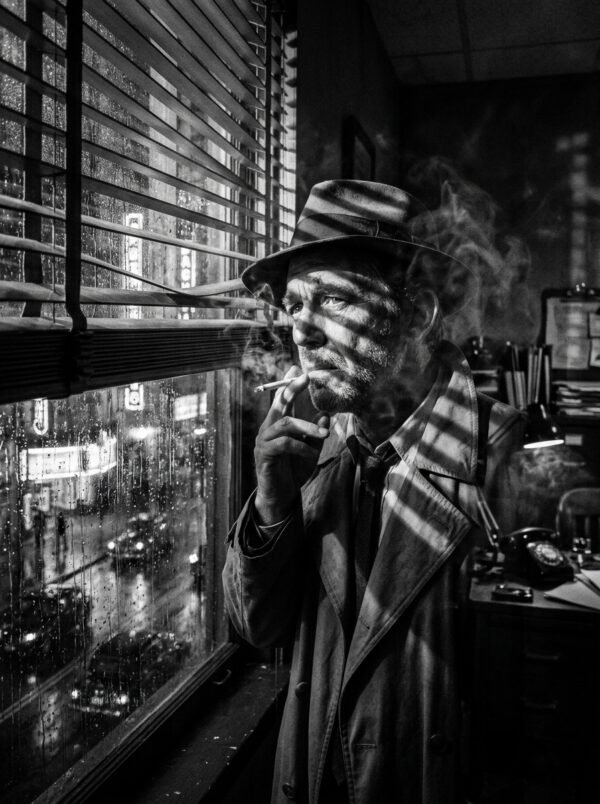
Blade Runner Neo-Noir Wet Street Neon Flare Anamorphic

⚡ Midjourney
PROMPT Optimized for Midjourney
A breathtaking anamorphic widescreen cinematic still inspired by Blade Runner 2049. A lone trench-coated figure walking down a rain-soaked futuristic metropolis alley at night. Wet black asphalt reflecting colossal holographic neon advertisements in electric amber and cyan. Anamorphic horizontal blue streak lens flares cutting across the frame. Atmospheric heavy rain and industrial steam rising from street vents. Shot on ARRI Alexa 65 with Panavision Anamorphic lenses, 2.39:1 aspect ratio, Roger Deakins cinematography masterpiece --ar 16:9 --v 6.0 --style raw
Share

MODEL OR TOOL
TAGS & LIBRARIES

Prompt Overview & Creative Notes

Creative Overview & Direction

An homage to Sir Roger Deakins’ Oscar-winning cinematography on ‘Blade Runner 2049’, this anamorphic widescreen still merges reflective wet streets with intense horizontal lens flares and industrial haze.

How to Use This Prompt

  1. Paste into Midjourney v6 using the trailing 16:9 aspect ratio parameters.
  2. Look for authentic anamorphic horizontal streak flares and rich teal-and-amber contrast.
  3. Ideal for film production concept art, desktop cinema wallpapers, and sci-fi storyboarding.

Pro Tips for Best Results

  • 2.39:1 Anamorphic Framing: Widescreen format gives immediate Hollywood cinematic scope.
  • Horizontal Streak Flares: Panavision anamorphic lens tags produce the iconic blue flare streaks.
  • Wet Pavement Reflections: Rain on asphalt acts as a giant natural mirror doubling all neon lighting.

Frequently Asked Questions

Q: Does this work in Gemini?
A: Yes! Simply drop the trailing ‘–ar 16:9 –v 6.0 –style raw’ flags.

How to Use This Prompt

  1. Click the "Copy Prompt" button below to copy the verified prompt text.
  2. Open your preferred AI tool (Midjourney, ChatGPT 4o, or Midjourney).
  3. Upload your subject or reference photo if creating character-consistent portraits.
  4. Paste the prompt, hit generate, and upscale your favorite variation.

Pro Tips for Best Results

  • Adjust lighting keywords like "golden hour" or "studio softbox" to match your desired mood.
  • Keep the camera and lens parameters intact to preserve high-fidelity skin micro-textures.
  • Works optimally with aspect ratio 16:9. Use 16:9 for desktop wallpapers or 9:16 for stories.

Frequently Asked Questions

Does this prompt work with free versions of Midjourney?

Yes! This prompt has been tested and tuned for both free and subscription versions, including Gemini 1.5 Flash/Pro, ChatGPT 4o, and Midjourney v6.

Can I customize the lighting, colors, or clothes?

Absolutely. You can modify any bracketed keyword or phrase (e.g. changing "charcoal jacket" to "linen shirt") while keeping the lighting and lens parameters intact.

What aspect ratio is recommended for this prompt?

The optimal aspect ratio tested for this prompt is 16:9. You can easily adapt it for square social posts (1:1) or vertical smartphone formats (9:16).

Verified

Every prompt, workflow, and technical photography guide on Prompt360 is systematically tested, vetted, and benchmarked across multimodal generative models including Google Gemini 1.5 Flash/Pro, ChatGPT 4o, and Midjourney v6 by the Prompt360 Labs team to guarantee photorealistic rendering, anatomical precision, and complete copyright safety.

Browse by Style

Find high-fidelity prompt recipes for every creative aesthetic.