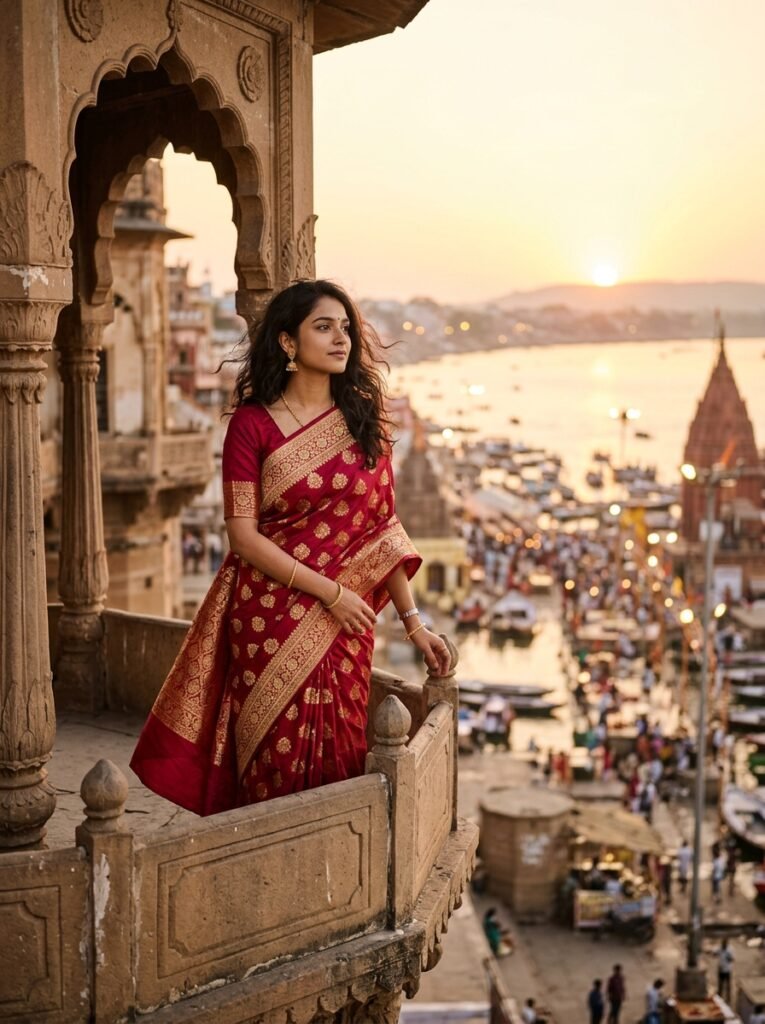
Customization Guidance
Customize the saree color by swapping [royal crimson-red] with [deep peacock blue] or [emerald green]. You can also replace [Varanasi ghats] with [Udaipur lake palace courtyard] for royal Rajasthan architecture.
Known Limitations & Advice
Generative models can occasionally hallucinate extra gold tassels on the pallu or misalign fingers resting on heritage stonework. If this occurs, regenerate with a slightly lower guidance scale or crop tighter on the torso.
How to Use This AI Photo Prompt
- Copy the Prompt: Click the Copy Prompt button above to place the prompt into your clipboard.
- Open Compatible AI Tool: Navigate to Google Gemini (Image Edit) (e.g. Google Gemini, ChatGPT, or Midjourney).
- Attach Reference (If Applicable): If you want to keep your own face or likeness, upload a well-lit, non-blurry portrait first.
- Paste & Generate: Paste the copied text into the prompt window and hit generate.
- Fine-Tune If Needed: If the model changes facial bone structure, remind it: “Maintain the original facial geometry from the reference photo without changes.”
About This Prompt
The Golden Hour Banarasi Silk Saree prompt is engineered to produce high-end ethnic fashion portraits that mirror editorial magazine photography from Harper’s Bazaar India or Vogue India. Traditional Indian silk sarees possess complex woven motifs (zari) and delicate micro-textures that generic prompts fail to reproduce. This prompt emphasizes authentic fabric drape, golden hour backlighting, and cultural context.
Lighting & Optical Specifications
- Focal Length: 85mm prime lens simulation for flattering facial compression and creamy background separation.
- Illumination: Low-angle evening sunset (golden hour) casting warm amber rim lighting across the hair and shoulder.
- Atmospheric Depth: Soft bokeh on distant ghat boat silhouettes and temple spires to keep the subject as the undisputed focal anchor.